Quick Verification (5 Minutes)
This guide shows you how to verify that Guccifer 2.0 used Microsoft Word 2007—not Word 2010 or any other version—to create the fabricated documents.
What you'll need:
- A web browser
- A text editor (Notepad works fine)
- Guccifer 2.0's "1.doc" file
What you'll verify:
- MSXML version in the embedded datastore (proves Word 2007, not Word 2010)
- Bibliography namespace reference (proves Word 2007 or later, not Word 2003)
Time required: About 5 minutes
Understanding the Evidence
Every RTF file saved by Microsoft Word contains an embedded "datastore" object with XML metadata that reveals the Word version used. This metadata is automatically embedded by Word during the save operation—users cannot alter it.
Two key version indicators:
- MSXML Version
- Word 2007 uses Msxml2.SAXXMLReader.5.0
- Word 2010 uses Msxml2.SAXXMLReader.6.0
- Bibliography Namespace
- Word 2007+ includes http://schemas.microsoft.com/office/2006/bibliography
- Word 2003 does not have this feature
Combined, these prove Word 2007:
- MSXML 5.0 → Word 2007 or earlier
- 2006 bibliography → Word 2007 or later
- Intersection: Word 2007
Step 2: Locate the DataStore
Option A: Using our interactive viewer (easiest)
Click here to jump directly to the datastore in 1.doc with highlighting:
View datastore in 1.doc →
The highlighted section shows the hexadecimal data we need to examine.
Option B: Using a text editor
- Open "1.doc" in Notepad (or any text editor)
- Press Ctrl+F to search
- Search for: {\*\datastore
- You'll see a large block of hexadecimal characters immediately after this tag
Step 3: Convert the Hex Data
Copy the hexadecimal block:
Starting immediately after {\*\datastore, copy the entire block of hex characters (they look like: 4d73786d6c322e534158584d4c526561646572...)
Convert to readable text:
- Go to Rapid Tables Hex to ASCII Converter
- Paste the hex data into the input field
- Click "Convert"
Step 4: Examine the Results
Finding 1: MSXML Version
At the top of the converted text, you'll see:
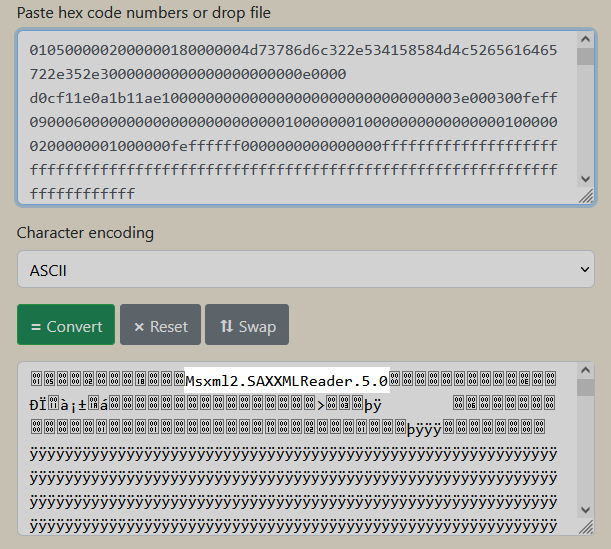
MSXML version from 1.doc datastore
Result: Msxml2.SAXXMLReader.5.0
What this means: This is the MSXML version embedded by Word 2007.
Finding 2: Bibliography Namespace
Scroll down in the converted text and you'll find:
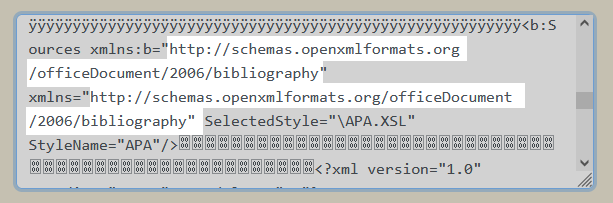
Bibliography namespace from 1.doc datastore
Result: http://schemas.microsoft.com/office/2006/bibliography
What this means: This is the bibliography feature introduced in Word 2007.
What Microsoft Documentation Says
According to Wikipedia (citing Microsoft TechNet):
MSXML 5.0 was a binary developed specifically for Microsoft Office. It originally shipped with Office 2003 and also ships with Office 2007. Microsoft has not released documentation for this version because Microsoft considers MSXML 5 an internal/integrated component of Office 2003. MSXML 5 is not included in Office 2010.
This definitively rules out Word 2010.
The 2006 bibliography namespace debuted in Word 2007, which rules out Word 2003.
Combined evidence:
- ✗ Not Word 2003 or older (no 2006 bibliography feature)
- ✓ Word 2007 (has both MSXML 5.0 and 2006 bibliography)
- ✗ Not Word 2010 or later (doesn't use MSXML 5.0)
Conclusion: Word 2007
Why This Matters
Confirming Word 2007 usage is important because it:
- Enables replication — Others can test with the exact same software version
- Validates other metadata claims — Knowing the exact version allows verification of version-specific behaviors
- Rules out alternatives — We can definitively say "not Word 2010" based on Microsoft's own documentation
- Supports the broader analysis — The Word version is one piece of the complete forensic picture
This Word version identification is part of a larger forensic analysis demonstrating systematic document fabrication. For the complete picture, see:
Guccifer 2.0's Document Fabrication Assembly Line: The 38KB Smoking Gun →
Additional Verification (Optional)
If you want to verify this finding further, you can:
Test 1: Check other Guccifer 2.0 documents
- 2.doc — Also contains MSXML 5.0
- 3.doc — Also contains MSXML 5.0
Test 2: Compare with Word 2010 output
- If you have access to Word 2010, save any document as RTF and check its datastore
- You'll find MSXML 6.0 instead of 5.0
Test 3: Local file link preservation
- Word 2010 strips unresolved file:// links for security
- Word 2007 preserves them
- Guccifer 2.0's documents preserve them (matching Word 2007 behavior)
To carry out these tests you can obtain Word 2007 and Word 2010 from the following locations:
Summary
What we verified:
- Guccifer 2.0's "1.doc" contains MSXML 5.0 (not 6.0)
- Microsoft documentation confirms MSXML 5.0 is not in Office 2010
- The document contains 2006 bibliography namespace (which came after Office 2003)
- Therefore: Word 2007
How long it took: ~5 minutes
Tools required: Text editor + web browser
Trust required: Zero—Microsoft's own documentation confirms the version identification
Related Verification Resources
Want to verify other aspects of the analysis?
Last updated: January 2026
This guide demonstrates one specific aspect of the forensic analysis: Word version identification. Every claim is independently verifiable using publicly available files and Microsoft's own documentation.